
co-cherry
커스텀 훅과 책임 분리 본문
커스텀 훅을 활용한 로직 분리
커스텀 훅(Custom Hook)
반복되는 로직을 React의 내장 훅을 활용하여 재사용 가능한 형태로 분리한 사용자 정의 훅
예를 들어, 같은 input 로직이 두 컴포넌트에 있다고 가정해보자.
EmailInput (Before)
import { useState } from "react";

function EmailInput() {
	const [email, setEmail] = useState("");

	const handleChange = (e: React.ChangeEvent<HTMLInputElement>) => {
		setEmail(e.target.value);
	};

	return (
		<div>
			<input value={email} onChange={handleChange} placeholder="email" />
		</div>
	);
}

export default EmailInput;
NicknameInput (Before)
import { useState } from "react";

function NicknameInput() {
	const [nickname, setNickname] = useState("");

	const handleChange = (e: React.ChangeEvent<HTMLInputElement>) => {
		setNickname(e.target.value);
	};

	return (
		<div>
			<input value={nickname} onChange={handleChange} placeholder="nickname" />
		</div>
	);
}

export default NicknameInput;
두 코드에서 input 상태 관리 로직이 동일하게 반복되는 것을 볼 수 있다.
이때, 사용하면 좋은 것이 커스텀 훅이다.
useInput(Custom Hook)
import { useState } from "react";

function useInput(initialValue: string) {
	const [value, setValue] = useState(initialValue);

	const onChange = (e: React.ChangeEvent<HTMLInputElement>) => {
		setValue(e.target.value);
	};

	return { value, onChange };
}

export default useInput;
EmailInput (After)
import useInput from "./useInput";

function EmailInput() {
	const { value, onChange } = useInput("");

	return <input value={value} onChange={onChange} placeholder="email" />;
}

export default EmailInput;
NicknameInput (After)
import useInput from "./useInput";

function NicknameInput() {
	const { value, onChange } = useInput("");

	return <input value={value} onChange={onChange} placeholder="nickname" />;
}

export default NicknameInput;
이렇게 input 상태 관리 로직을 커스텀 훅으로 분리함으로써 여러 컴포넌트에서 동일한 로직을 재사용할 수 있게 되었다.
또, 컴포넌트는 UI를 담당하고 커스텀 훅은 상태 관리와 로직을 담당하게 되어 컴포넌트의 책임이 명확히 분리되는 것을 알 수 있다.
커스텀 훅을 사용하면 코드의 재사용성과 가독성을 높이고 컴포넌트의 구조를 보다 깔끔히 유지할 수 있다.
주의할 점
- Hook의 이름은 항상 use + 대문자 조합이어야 한다. (useState, useEffect 등)
- 커스텀 훅은 state 자체를 공유하는 것이 아닌 state를 관리하는 로직을 공유하는 것이다.
- 모든 Hook은 컴포넌트가 렌더링 될 때마다 다시 실행되므로, 커스텀 훅 내부의 로직 또한 컴포넌트 코드처럼 순수하게 작성하는 것이 중요하다.
https://ko.react.dev/learn/reusing-logic-with-custom-hooks#
커스텀 Hook으로 로직 재사용하기 – React
The library for web and native user interfaces
ko.react.dev
useReducer + Context 조합 패턴
useReducer
React에서 상태를 업데이트 하는 로직을 reducer 함수로 분리해 관리할 수 있게 하는 Hook
*reducer 현재 상태(state)와 어떤 동작(action)을 받아서 새로운 상태를 반환하는 함수
const [state, dispatch] = useReducer(reducer, initialState)- state 현재 상태
- dispatch 상태 변경을 요청하는 함수
- reducer 어떤 action이 왔을 때 state를 어떻게 바꿀지 정의한 함수
보통 useState는 간단한 상태를 다룰 때 편하지만, 상태 변경 규칙이 많아지면 코드가 복잡해질 수 있음
→ useReducer를 사용해 상태 변경 규칙을 한 곳에 모아서 체계적으로 관리하는 것이 좋음
Context
React에서 여러 컴포넌트가 공통으로 사용해야 하는 값을 props 없이 전달할 수 있게 해주는 기능
props drilling
특정 컴포넌트에서 필요한 데이터를 전달하기 위해, 해당 데이터를 사용하지 않는 중간 컴포넌트들이 불필요하게 props를 받아 전달해야 하는 상황
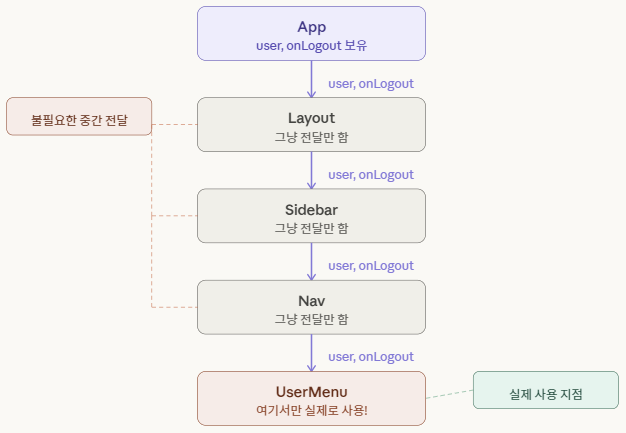
이처럼 props drilling이 발생하면 실제로 데이터를 사용하는 컴포넌트가 아님에도 불구하고, 중간 컴포넌트들이 단순히 데이터 전달하기 위해 props를 받아야 하는 문제가 발생한다.
컴포넌트 구조가 깊어질수록 이러한 props 전달 과정은 점점 복잡해지고 코드의 가독성과 유지보수성에도 영향을 줄 수 있다.
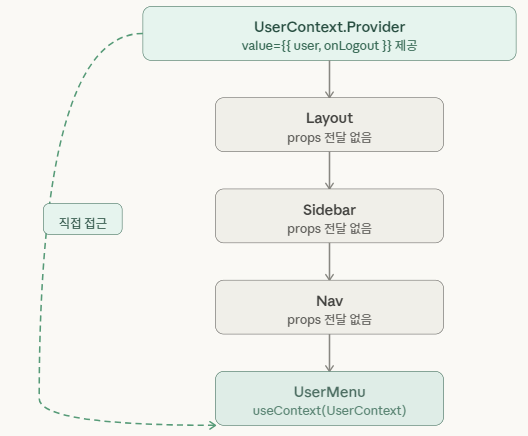
이러한 문제를 해결하기 위해 React에서는 Context API를 제공한다.
Context API를 사용하면 중간 컴포넌트를 거치지 않고도 필요한 컴포넌트에서 직접 데이터를 사용할 수 있다.
왜 Context와 useReducer를 함께 사용할까?
context를 사용하면 여러 컴포넌트가 공통으로 사용하는 값을 props 없이 전달할 수 있게 된다.
하지만 context는 단순히 데이터를 전달하는 역할만 할 뿐, 상태를 어떻게 변경할지에 대한 로직을 관리하는 기능은 제공하지 않는다.
즉, 여러 컴포넌트가 같은 상태를 사용하더라도 상태 변경 로직이 여러 곳에 흩어지게 되면 코드의 구조가 복잡해질 수 있다.
이러한 문제를 해결하기 위해 useReducer와 Context API를 함께 사용하는 패턴이 자주 활용된다.
- Context → 여러 컴포넌트에 상태 공유
- useReducer → 상태 변경 로직을 한 곳에서 관리
이 두 가지를 함께 사용하면 상태 공유와 상태 관리 로직을 분리하여 구조적으로 관리할 수 있다.
Context는 상태를 전달하는 역할을 하고 useReducer는 상태 변경 규칙을 관리하는 역할을 하므로 두 기능을 함께 사용하면 전역 상태를 보다 체계적으로 관리할 수 있다.
예시 To-do
import { createContext, useContext, useReducer } from "react";

// reducer
function todoReducer(state, action) {
	switch (action.type) {
		case "ADD":
			return [...state, action.text];
		default:
			return state;
	}
}

// context 생성
const TodoContext = createContext(null);

// provider
export function TodoProvider({ children }) {
	const [todos, dispatch] = useReducer(todoReducer, []);

	return (
		<TodoContext.Provider value={{ todos, dispatch }}>
			{children}
		</TodoContext.Provider>
	);
}

// 커스텀 훅
export function useTodo() {
	return useContext(TodoContext);
}
import { useTodo } from "./TodoContext";
function TodoApp() {
const { todos, dispatch } = useTodo();
return (
<div>
<button onClick={() => dispatch({ type: "ADD", text: "React 공부" })}>
Todo 추가
</button>
<ul>
{todos.map((todo, i) => (
<li key={i}>{todo}</li>
))}
</ul>
</div>
);
}
export default TodoApp;
import { TodoProvider } from "./TodoContext";
import TodoApp from "./TodoApp";

function App() {
	return (
		<TodoProvider>
			<TodoApp />
		</TodoProvider>
	);
}

export default App;
- useReducer를 통해 Todo 목록 상태와 상태 변경 로직을 생성한다.
- Context API를 통해 해당 상태와 dispatch 함수를 여러 컴포넌트에 공유한다.
- useContext를 사용하여 필요한 컴포넌트가 Context에 저장된 값을 직접 사용할 수 있게 된다.
→ useTodo()를 호출하면 todos 상태와 dispatch 함수를 가져와 상태를 조회하거나 업데이트할 수 있다.
언제 사용하면 좋을까?
- 장바구니, 인증처럼 여러 컴포넌트가 같은 상태를 읽고 써야 할 때
- add / remove / reset 처럼 액션 종류가 많아 useState로는 분기가 복잡해질 때
- 상태 변경 로직을 컴포넌트 밖 reducer에 몰아서 테스트하기 쉽게 만들고 싶을 때
- Redux는 무겁고 외부 라이브러리 없이 전역 상태를 관리하고 싶을 때
https://ko.react.dev/learn/extracting-state-logic-into-a-reducer
State 로직을 Reducer로 작성하기 – React
The library for web and native user interfaces
ko.react.dev
https://ko.react.dev/reference/react/useReducer
useReducer – React
The library for web and native user interfaces
ko.react.dev
Composition 전략
Composition
여러 개의 작은 컴포넌트를 조합하여 하나의 UI를 구성하는 방식
React에서는 기능을 상속을 통해 확장하기 보다, 컴포넌트를 조합하여 구성하는 것을 권장하고 있다.
예시 (Composition 사용 전)
interface CardProps {
  title: string;
  description: string;     // 내부 구조가 고정
  imageUrl: string;
  buttonLabel: string;
  onButtonClick: () => void;
}

function Card({ title, description, imageUrl, buttonLabel, onButtonClick }: CardProps) {
  return (
    <div className="card">
      <img src={imageUrl} />
      <h2>{title}</h2>
      <p>{description}</p>
      <button onClick={onButtonClick}>{buttonLabel}</button>
    </div>
  );
}
import { ReactNode } from 'react';

// 1. 각 영역을 독립 서브컴포넌트로 분리
function Card({ children }: { children: ReactNode }) {
  return <div className="card">{children}</div>;
}

function CardHeader({ children }: { children: ReactNode }) {
  return <div className="card-header">{children}</div>;
}

function CardBody({ children }: { children: ReactNode }) {
  return <div className="card-body">{children}</div>;
}

function CardFooter({ children }: { children: ReactNode }) {
  return <div className="card-footer">{children}</div>;
}

// 2. 네임스페이스로 묶어서 export
Card.Header = CardHeader;
Card.Body   = CardBody;
Card.Footer = CardFooter;


export { Card };
예시 (Composition 사용 후)
위 예시는 이전에 설명한 Compound Component 패턴을 활용한 Composition 전략의 예시이다.
import { Card } from './Card';

function ProductCard() {
  return (
    <Card>
      <Card.Header>
        <img src="/product.png" alt="product" />
      </Card.Header>
      <Card.Body>
        <h2>상품명</h2>
        <p>상품 설명</p>
      </Card.Body>
      <Card.Footer>
        <button>장바구니 담기</button>
      </Card.Footer>
    </Card>
  );
}
Composition의 장점
- 컴포넌트를 재사용하기 쉽다.
- UI 구조를 이해하기 쉽다.
- 각 컴포넌트의 역할이 명확해진다.
- 유지보수가 쉬워진다.
https://ko.legacy.reactjs.org/docs/composition-vs-inheritance.html
합성 (Composition) vs 상속 (Inheritance) – React
A JavaScript library for building user interfaces
ko.legacy.reactjs.org
같은 기능을 다른 훅 구조로 구현해보기
이번에는 세 가지 버전으로 회원가입 폼을 구현해보았다.
- useState
- Custom Hook
- useReducer + Context
세 가지 버전의 코드를 비교 분석해보자
useState
- 가장 단순하고 직관적인 방식
- 상태 하나당 useState 하나를 선언하며, 컴포넌트 안에 상태와 로직이 함께 존재하는 형태
장점
- 코드 흐름이 위에서 아래로 직관적
- 별도 구조 없이 바로 작성 가능
- 상태가 1~2개인 단순한 UI에 적합
import { useState } from "react";

function SignupForm() {
  const [nickname, setNickname] = useState("");
  const [email, setEmail] = useState("");
  const [password, setPassword] = useState("");

  const [nicknameError, setNicknameError] = useState("");
  const [emailError, setEmailError] = useState("");
  const [passwordError, setPasswordError] = useState("");

  const [isSubmitting, setIsSubmitting] = useState(false);

  function validate() {
    let valid = true;

    if (nickname.length < 2) {
      setNicknameError("닉네임은 2자 이상이어야 해요.");
      valid = false;
    } else {
      setNicknameError("");
    }

    if (!email.includes("@")) {
      setEmailError("올바른 이메일을 입력해주세요.");
      valid = false;
    } else {
      setEmailError("");
    }

    if (password.length < 6) {
      setPasswordError("비밀번호는 6자 이상이어야 해요.");
      valid = false;
    } else {
      setPasswordError("");
    }

    return valid;
  }

  async function handleSubmit(e: React.FormEvent) {
    e.preventDefault();
    if (!validate()) return;

    setIsSubmitting(true);
    await new Promise((res) => setTimeout(res, 1000)); // 서버 요청 시뮬레이션
    setIsSubmitting(false);
    alert("가입 완료!");
  }

  return (
    <form onSubmit={handleSubmit} style={{ display: "flex", flexDirection: "column", gap: 12 }}>
      <div>
        <input placeholder="닉네임" value={nickname} onChange={(e) => setNickname(e.target.value)} />
        {nicknameError && <p style={{ color: "red" }}>{nicknameError}</p>}
      </div>
      <div>
        <input placeholder="이메일" value={email} onChange={(e) => setEmail(e.target.value)} />
        {emailError && <p style={{ color: "red" }}>{emailError}</p>}
      </div>
      <div>
        <input placeholder="비밀번호" type="password" value={password} onChange={(e) => setPassword(e.target.value)} />
        {passwordError && <p style={{ color: "red" }}>{passwordError}</p>}
      </div>
      <button type="submit" disabled={isSubmitting}>
        {isSubmitting ? "가입 중..." : "가입하기"}
      </button>
    </form>
  );
}

export default SignupForm;
Custom Hook
- 상태와 로직을 훅 함수로 분리하는 방식
- 컴포넌트는 훅이 반환한 값만 사용하며, "어떻게 보여줄까"와 "어떻게 동작할까"를 명확히 나눔
장점
- 같은 로직을 여러 컴포넌트에서 재사용 가능
- 컴포넌트는 UI 렌더링에만 집중할 수 있어 관심사 분리가 명확
- 렌더링 없이 훅 로직만 독립적으로 테스트 가능
- 내부 구현이 useState와 동일해 기존 코드에서 마이그레이션 부담 없음
import { useState } from "react";

type Fields = {
  nickname: string;
  email: string;
  password: string;
};

type Errors = Partial<Record<keyof Fields, string>>;

function useForm(initialValues: Fields) {
  const [values, setValues] = useState<Fields>(initialValues);
  const [errors, setErrors] = useState<Errors>({});
  const [isSubmitting, setIsSubmitting] = useState(false);

  function handleChange(field: keyof Fields) {
    return (e: React.ChangeEvent<HTMLInputElement>) => {
      setValues((prev) => ({ ...prev, [field]: e.target.value }));
    };
  }

  function validate(): boolean {
    const newErrors: Errors = {};

    if (values.nickname.length < 2) newErrors.nickname = "닉네임은 2자 이상이어야 해요.";
    if (!values.email.includes("@")) newErrors.email = "올바른 이메일을 입력해주세요.";
    if (values.password.length < 6) newErrors.password = "비밀번호는 6자 이상이어야 해요.";

    setErrors(newErrors);
    return Object.keys(newErrors).length === 0;
  }

  function handleSubmit(onSubmit: (values: Fields) => Promise<void>) {
    return async (e: React.FormEvent) => {
      e.preventDefault();
      if (!validate()) return;

      setIsSubmitting(true);
      await onSubmit(values);
      setIsSubmitting(false);
    };
  }

  return { values, errors, isSubmitting, handleChange, handleSubmit };
}
function SignupForm() {
  const { values, errors, isSubmitting, handleChange, handleSubmit } = useForm({
    nickname: "",
    email: "",
    password: "",
  });

  const onSubmit = handleSubmit(async (values) => {
    await new Promise((res) => setTimeout(res, 1000));
    alert(`가입 완료! 닉네임: ${values.nickname}`);
  });

  return (
    <form onSubmit={onSubmit} style={{ display: "flex", flexDirection: "column", gap: 12 }}>
      <div>
        <input placeholder="닉네임" value={values.nickname} onChange={handleChange("nickname")} />
        {errors.nickname && <p style={{ color: "red" }}>{errors.nickname}</p>}
      </div>
      <div>
        <input placeholder="이메일" value={values.email} onChange={handleChange("email")} />
        {errors.email && <p style={{ color: "red" }}>{errors.email}</p>}
      </div>
      <div>
        <input placeholder="비밀번호" type="password" value={values.password} onChange={handleChange("password")} />
        {errors.password && <p style={{ color: "red" }}>{errors.password}</p>}
      </div>
      <button type="submit" disabled={isSubmitting}>
        {isSubmitting ? "가입 중..." : "가입하기"}
      </button>
    </form>
  );
}

export default SignupForm;
useReducer + Context
- 상태를 Context에 올려 트리 어디서든 접근 가능하게 하는 방식
- 상태 변경은 반드시 dispatch(action)으로만 가능하도록 강제
장점
- props 없이 어느 컴포넌트에서든 useContext로 상태에 바로 접근 가능
- 상태가 바뀌는 경로가 dispatch 하나뿐이라 버그 발생 시 추적이 용이
- action 타입 정의만 봐도 어떤 상태 변화가 가능한지 한눈에 파악 가능
// 타입
type FormState = {
  nickname: string;
  email: string;
  password: string;
  errors: Partial<Record<"nickname" | "email" | "password", string>>;
  isSubmitting: boolean;
};

type FormAction =
  | { type: "SET_FIELD"; field: keyof Omit<FormState, "errors" | "isSubmitting">; value: string }
  | { type: "SET_ERRORS"; errors: FormState["errors"] }
  | { type: "SET_SUBMITTING"; value: boolean };


// Reducer
const initialState: FormState = {
  nickname: "",
  email: "",
  password: "",
  errors: {},
  isSubmitting: false,
};

function formReducer(state: FormState, action: FormAction): FormState {
  switch (action.type) {
    case "SET_FIELD":
      return { ...state, [action.field]: action.value };
    case "SET_ERRORS":
      return { ...state, errors: action.errors };
    case "SET_SUBMITTING":
      return { ...state, isSubmitting: action.value };
  }
}


// Context
type FormContextValue = {
  state: FormState;
  dispatch: React.Dispatch<FormAction>;
};

const FormContext = createContext<FormContextValue | null>(null);

function useFormContext() {
  const ctx = useContext(FormContext);
  if (!ctx) throw new Error("FormProvider 안에서 사용하세요.");
  return ctx;
}

function FormProvider({ children }: { children: React.ReactNode }) {
  const [state, dispatch] = useReducer(formReducer, initialState);
  return <FormContext.Provider value={{ state, dispatch }}>{children}</FormContext.Provider>;
}
function PreviewCard() {
const { state } = useFormContext();
return (
<div style={{ border: "1px solid #ccc", padding: 12, borderRadius: 8 }}>
<p>닉네임 미리보기: {state.nickname || "—"}</p>
<p>이메일 미리보기: {state.email || "—"}</p>
</div>
);
}
function SignupForm() {
const { state, dispatch } = useFormContext();
const { nickname, email, password, errors, isSubmitting } = state;
function validate(): boolean {
const newErrors: FormState["errors"] = {};
if (nickname.length < 2) newErrors.nickname = "닉네임은 2자 이상이어야 해요.";
if (!email.includes("@")) newErrors.email = "올바른 이메일을 입력해주세요.";
if (password.length < 6) newErrors.password = "비밀번호는 6자 이상이어야 해요.";
dispatch({ type: "SET_ERRORS", errors: newErrors });
return Object.keys(newErrors).length === 0;
}
async function handleSubmit(e: React.FormEvent) {
e.preventDefault();
if (!validate()) return;
dispatch({ type: "SET_SUBMITTING", value: true });
await new Promise((res) => setTimeout(res, 1000));
dispatch({ type: "SET_SUBMITTING", value: false });
alert(`가입 완료! 닉네임: ${nickname}`);
}
return (
<form onSubmit={handleSubmit} style={{ display: "flex", flexDirection: "column", gap: 12 }}>
<div>
<input
placeholder="닉네임"
value={nickname}
onChange={(e) => dispatch({ type: "SET_FIELD", field: "nickname", value: e.target.value })}
/>
{errors.nickname && <p style={{ color: "red" }}>{errors.nickname}</p>}
</div>
<div>
<input
placeholder="이메일"
value={email}
onChange={(e) => dispatch({ type: "SET_FIELD", field: "email", value: e.target.value })}
/>
{errors.email && <p style={{ color: "red" }}>{errors.email}</p>}
</div>
<div>
<input
placeholder="비밀번호"
type="password"
value={password}
onChange={(e) => dispatch({ type: "SET_FIELD", field: "password", value: e.target.value })}
/>
{errors.password && <p style={{ color: "red" }}>{errors.password}</p>}
</div>
<button type="submit" disabled={isSubmitting}>
{isSubmitting ? "가입 중..." : "가입하기"}
</button>
</form>
);
}
function SignupPage() {
return (
<FormProvider>
<SignupForm />
<PreviewCard />
</FormProvider>
);
}
export default SignupPage;
useReducer + Context를 쓰기엔 비교적 간단한 예시라서 과하게 사용할 필요 없이 Custom Hook을 사용하는 것이 가장 적합한 예시라고 느껴진다.
'React' 카테고리의 다른 글
| useMemo, useCallback을 활용한 상세 페이지 구현하기 (w. TMDB) (0) | 2026.04.12 |
|---|---|
| Tanstack query 활용한 무한 스크롤 페이지 (w.TMDB) (0) | 2026.03.29 |
| TanStack Query (0) | 2026.03.27 |
| 상태 관리 전략 비교 (0) | 2026.03.22 |
| 컴포넌트 설계 원칙 정리와 중복 로직 리팩토링 (0) | 2026.03.05 |